This is a preview of the Storyblok Website with Draft Content

JoyConf 2026 is back. Content Confidence. Human Connection. Save your spot!

Browse apps
Install

Requires Growth plan

Author
Storyblok GmbH
Last update
5/18/2026
Translatable slugs
Use different URLs for each language version
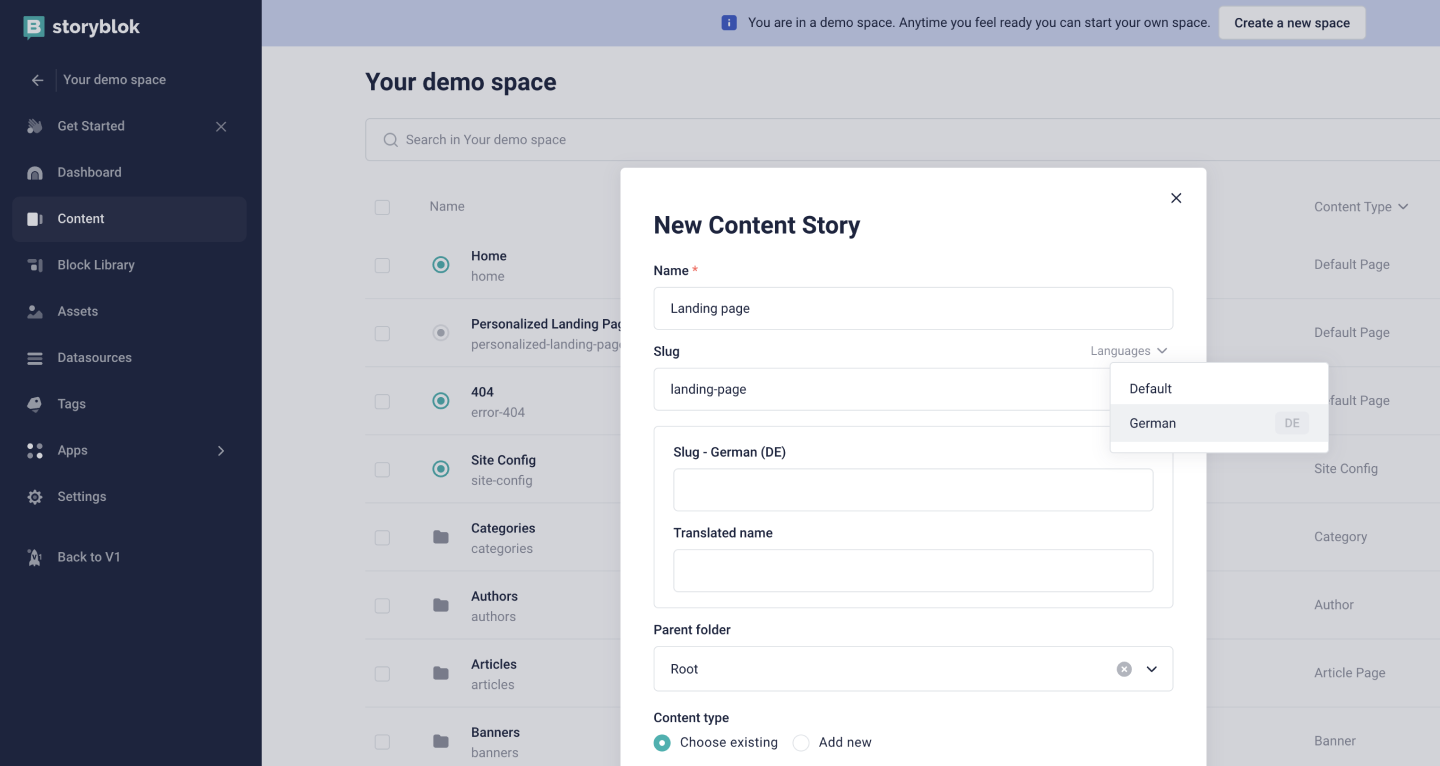
Use the Translatable Slugs app to define different slugs for folders and stories. Each slug maps to a language enabled under SettingsInternationalization in your Storyblok space. The app pairs well with the field-level translation approach to content localization.

Once installed, specify a translated slug in the Config section of the Visual Editor. Open the Languages submenu next to the default slug to set a translated name and a translated slug per configured language. Alternatively, select a story or folder in the Content section of a Storyblok space, open its settings, and access the Languages submenu in the modal.

If no translated slug is provided for a language, Storyblok serves the default language.

Combine the Translatable slugs app with the Advanced paths app to build custom URL structures.

Content Delivery API

The Content Delivery API returns the localized slugs for each folder and story. The exact contents of the translated_slugs object depend on the space settings and the story's status.

The following lists detail the expected responses:

Publish translations individually is enabled

Non-root page (is_startpage: false)

  • Translated slug
    • Draft → "published": null
    • Published → "published": true
    • Unpublished → "published": false
  • No translated slug
    • Draft → "published": null
    • Published → "published": null
    • Unpublished → "published": null

Root page (is_startpage: true)

  • Translated slug
    • Draft → "published": null
    • Published → "published": true
    • Unpublished → "published": false
  • No translated slug
    • Draft → "published": null
    • Published → "published": true
    • Unpublished → "published": null

Publish translations individually is disabled

Non-root page (is_startpage: false)

  • Translated slug
    • Draft → "published": false
    • Published → "published": true
    • Unpublished → "published": false
  • No translated slug
    • Draft → "published": null
    • Published → "published": null
    • Unpublished → "published": null

Root page (is_startpage: true)

  • Translated slug
    • Draft → "published": false
    • Published → "published": true
    • Unpublished → "published": false
  • No translated slug
    • Draft → "published": false
    • Published → "published": true
    • Unpublished → "published": false

To learn about the relevant API responses, refer to the link object endpoint or the story object endpoint documentation.

Create, update, and delete translated slugs via the Management API

Update and delete operations require the Update a Story endpoint (PUT). The Create a Story endpoint (POST) only supports adding new translated slugs. A single PUT request may mix all three operations in one array:

  • Create — omit id and provide lang and slug (and optionally name and published).
  • Update — include the existing id together with the fields to change.
  • Delete — include the existing id and set _destroy to true.

The translated_slugs field of the story response contains the existing IDs needed for update and delete operations.