Mistakes, Malfunctions, and Malice: Protecting yourself from rogue agents

Storyblok is the first headless CMS that works for developers & marketers alike.
Earlier this year, Storyblok announced the sunsetting and revocation of all legacy unscoped personal access tokens (opens in a new window) on November 30, and since May has required users to either scope their tokens or opt into creating a “full user permission” token for unscoped use.
While there were a number of reasons for this change, one of the most important was to better adhere to the principle of least privilege (opens in a new window), rather than allow all tokens complete and unrestricted read-write access to all of a user’s spaces.
Review our access tokens concept for more information on scoping new tokens and our recommendations for when a token with full user permission may be considered.
It can be tempting to construct an AI agent, grant it as much access and control as it can be given, and unleash it into a workflow to handle any task or problem that comes its way, but this can become a dangerous pitfall.
Unchecked access can already be risky even in cautious hands, but the more abstracted that access becomes, the higher the risk of something going wrong. For example, what might happen if a malfunctioning agent were to interface directly with an MCP server using a personal access token with full access to a user’s complete array of spaces?
The goal of this article is to make the case for internalizing the principle of least privilege and applying it to the whole of your approach to AI, as well as help you rethink your approach to access and permissions, especially as part of a workflow or integration.
Setting healthy boundaries
There are a number of reasons why creating guardrails for your agents is so critically important, even if you feel confident in your ability to write the perfect, most airtight prompts.
Clarity
By restricting what an agent can or can’t do (whether through specific instruction or a tight token scope), it clarifies the role, capabilities, and expectations of the agent among the rest of the project. With unrestricted access, it can be easy to inadvertently overburden an agent with too many skills or too much control, resulting in one agent managing everything in a tangled mass of integrations.
Much like the composability of Storyblok itself, componentizing and compartmentalizing your agents’ actions makes them easier to read, amend, and organize your process in a meaningful way—it gives each task a clear identity and a clear purpose.
Security
An agent with too much access can leave your system at risk, even if you don’t realize it. When it comes to restricting what your agent is capable of, it helps to keep in mind these three M’s: mistakes, malfunctions, and malice.
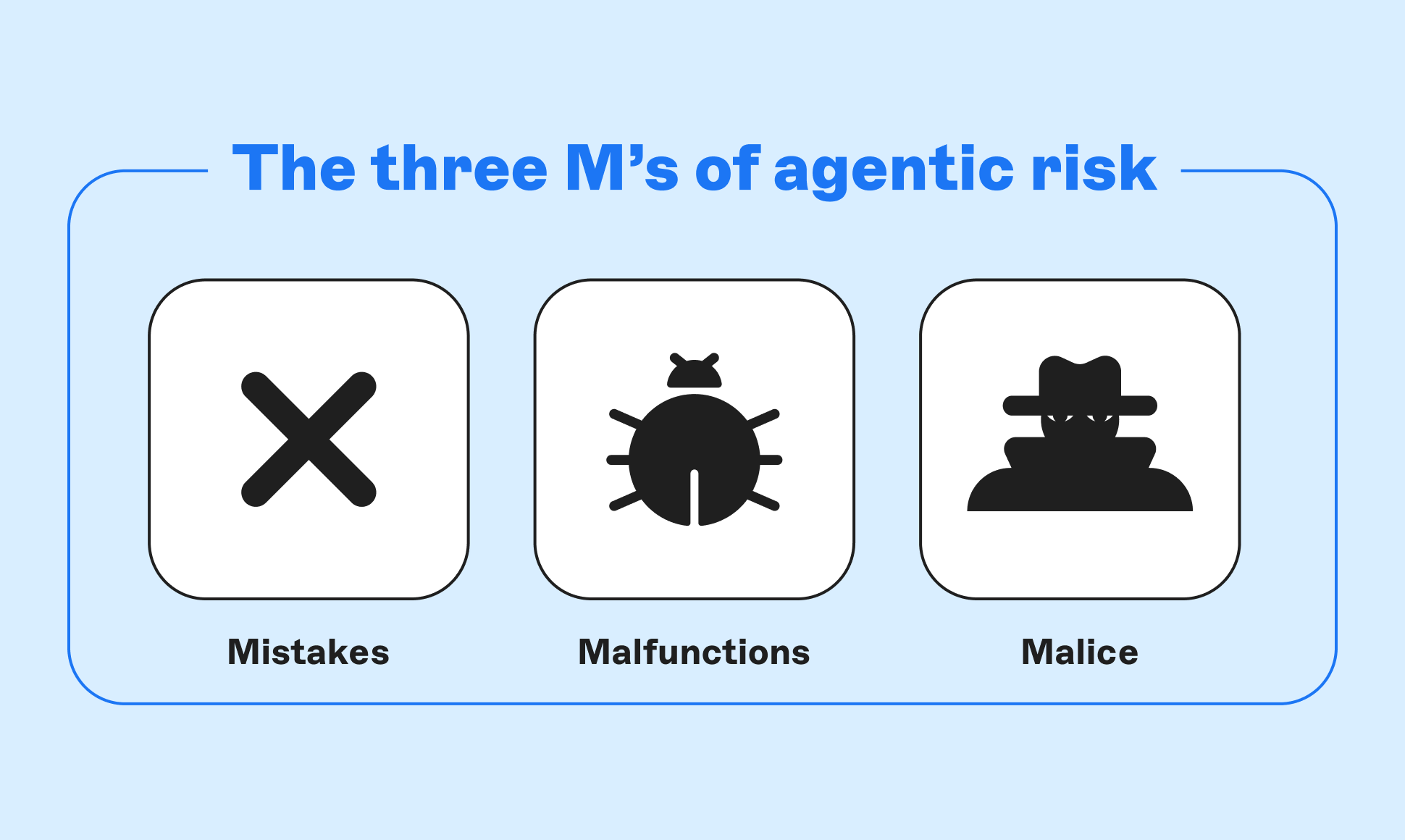 Mistakes happen, which is why it’s useful to set boundaries in case a slip of the finger or a forgotten bit of instruction result in your agent going rogue. From making a typo writing someone’s email address to mistakenly capitalizing a flag in the command prompt, you may be familiar with just how unexpected the results can be if even one character is out of place.
An error in agent instructions as simple as typing "do publish" instead of "don't publish" or an accidental double negative such as "don't not publish" could send your agent down a completely different path, or bypass restrictions you intended to set down.
Similarly, agents are not perfect, and can malfunction or hallucinate under the wrong circumstances. Even if you tee them up with skills and prompts that should do what you expect them to do, there is always the possibility of a command being interpreted the wrong way, which can lead to actions that weren’t accounted for.
Remember that systems involving agentic integrations are probabilistic, not deterministic. Expected output can be predicted but never fully guaranteed, which is why it is so important to restrict access to the bare minimum necessary to accomplish designated or intended tasks.
Lastly, malicious attacks like prompt injections are always a risk if your agent has any public-facing presence in your build. If you’re relying on your agent’s prescribed skills to keep it behaving as expected, you’re leaving yourself open to any attacker persistent enough to pester your AI into doing something it shouldn’t.
Agents unleashed
By using more restrictive tokens (and being vigilant about permissions for mutating or destructive changes), you can rest assured that the risk of serious damage being caused by an agent are greatly reduced.
Of course, as anyone who’s spent time in tech knows, there is no such thing as perfect security, so even with these guardrails in place, it’s critically important to verify what your agents are doing and how their access is being limited, rather than implicitly trust that they are acting as intended.
Storyblok’s new method of generating personal access tokens prioritizes minimizing access rather than maximizing it for that very reason. When building a new token, alongside naming it and setting an expiration date, you will be prompted to decide which space or spaces it should have access to, as well as which scopes it should have permissions for.
As mentioned earlier, when generating a new token, there is a toggle for enabling “full user permission”, which grants full access to any operation the user is capable of. This should be used extremely sparingly—preferably in development environments only—to mitigate risk. Review our Access Token Concept page for more information.
By default, a new token will have no scopes selected in order to prevent overscoping, and should be selected one at a time so you are conscious of what you are granting access to anything that utilizes it. If a scope or permission is not absolutely necessary for a workflow to function, it should not be selected, and even in cases where it is necessary, it should be considered whether the permissions selected should be granted to separate tokens to ensure a stopgap exists between certain agentic actions.
While most scopes will have discrete read and write permissions, there are a few exceptions: the Statistics scope only has a read permission (with no write permission available) as this information cannot be manually written in the first place, while releases and stories have an additional third permission, publish.
It is recommended that anything with write access for releases and stories not have publish access, as doing so runs the risk of an agent being able to both generate content and publish it such that it is viewable publicly before any human has seen the content it produced. Publishing content and releases should either be done exclusively by a human operator, or by a separate workflow after a pause that otherwise requires a human to confirm and manually resume operation.
The golden rule
When it comes to an agentic workflow, especially with the assistance of an MCP server like Storyblok’s, there is one rule that will protect you and your agents from making costly errors: nothing should appear or disappear without human approval.
Now, what does this mean exactly? In the case of disappearing, there should never be an instance where an agent is allowed to delete data without explicit approval. In the case of the Storyblok MCP server, it will automatically require human confirmation before initiating any destructive actions, such as deleting stories or purging spaces. While this is a very useful tool for preventing data-loss disaster, for any other actions, you will need to be the one to set down guardrails.
While the Storyblok MCP server requires confirmation before performing destructive actions, these actions are irreversible. Be sure to read carefully exactly what actions are being suggested by your agent before confirming. For more information, read our Practical Guide or our MCP Server reference material.
As for appearing, while it is ultimately up to you how freely you want your agents to be able to generate, create, and amend, it is highly recommended that agents be either given tightly-scoped tokens with minimal permissions to prevent publishing capabilities, or explicitly instructed not to publish what they produce (preferably both). There are many ways to accomplish this, but phrases such as “Save as a draft” or “Do not publish when complete” will give you a much better safety net than without.
It’s important to be sure that your agent doesn’t move faster than you can keep up with, confirmations are crucial for keeping a human in the loop at all critical junctions. The last thing you want is an agent going rogue, generating content no human has laid eyes on, and publishing it where everyone can see—anything your agents do is ultimately your responsibility, so keep that in mind before you let your agents take the wheel by themselves.
The reset button
No matter how many safeguards you set in place—specifying ahead of time the purpose of your agent, restricting access and control with token scopes and well-detailed skills, requiring human intervention at predetermined steps—there is always one final way an agentic workflow can cause you stress and cost you time and even money if you aren’t prepared for it: you simply decide that you don’t want to utilize whatever your workflow has produced.
Sometimes, solving this is trivial. If an agentic workflow has produced a story for you and flags it for human review, it’s simple to reject the agentic submission rather than publish it or delete the story outright and start from scratch. If an agent starts referring to information you decide you don’t want it reading, you tighten the token scope to restrict its access.
The problem is, these really only cover the “C” and “R” in CRUD (create, read, update, delete). What happens if an agentic workflow makes changes to something that don’t require human confirmation, or deletes stories or assets outright?
This is where preparation really comes in: anything an agent is capable of doing should be paired with some means of rapidly undoing it whenever possible. For instance, you have an agent translating the content of a story, but come to realize that instead of adding translations to the existing story, it has been overwriting the original content each time.
Fortunately, Storyblok has you covered via the History in a given story’s Visual Editor, as well as the restore_with endpoint if you prefer to work directly with the Management API. By hitting this endpoint with the story version ID of the last known correct iteration, you can revert all non-destructive changes made since then.
try {
  const response = await storyblok.get('spaces/:space_id/stories/:story_id/restore_with', {
    "version": story_version_id,
    "versions_v2": "true"
  })
  console.log({ response })
} catch (error) {
  console.log(error)
}To learn more about the restore_with endpoint, refer to the Restore a Story Version (opens in a new window) page of our Reference docs.
There are a number of ways to prepare yourself for the possibility of needing to undo work done by AI agents. No matter what your approach, it’s important to remember that in the end, you are responsible for what your agents do, up to and including recognizing when an action taken was ultimately incorrect. Tight scopes and a reset button protect your content, your customers, and yourself, so be sure to use these tips to delegate tasks responsibly.
In conclusion
In this post, we’ve gone over the following concepts:
- the end of legacy unscoped personal access tokens at Storyblok, and some of the reasons why
- how to make your workflow more comprehensible through narrow scoping
- how access restriction protects you from human error, machine error, and bad actors
- the reasoning behind limiting scope and access, especially publishing permissions
- how to more safely prompt agents to reduce the risk of rogue actions
- the importance of reversibility of or human confirmation before any mutating or destructive action
Setting guardrails for agentic workflows is fundamental to ensuring smooth operation and platform security. It may seem easier to allow blanket access to an agent or process to reduce obstacles and speed up workflows, but the risk of damage being done is too great to just set it and forget it.