Announcing @storyblok/schema 1.0

Storyblok is the first headless CMS that works for developers & marketers alike.
We are excited to announce that @storyblok/schema is now stable. After a deliberately slow-paced rollout and plenty of your feedback, schema objects matured into a reliable, DX-first approach to defining blocks, fields, and datasources in code. Instead of being bound to the Storyblok UI, you and your AI agents can now alternatively manage creation, updates, and migrations via TypeScript objects and push changes from the CLI.
There are a few changes compared to previous versions and new ways to integrate schemas into your developer workflow.
Integrating @storyblok/schema into existing projects
To get started with Storyblok schema, you'll need a Storyblok space, the Storyblok CLI, TypeScript, and @storyblok/schema itself.
Bootstrapping from an existing space
First make sure that all dependencies are installed, then authenticate with the CLI and run storyblok schema init.
npm install storyblok typescript @storyblok/schema
npx storyblok login --token=YOUR_PERSONAL_ACCESS_TOKEN
npx storyblok schema init --space YOUR_SPACE_ID
This last command turns the blocks, fields, and datasources present in your Storyblok space into schema objects and writes them to .storyblok/schema. The most notable of those new files are:
- the blocks directory with its many
.tsfiles - the
schema.tsroot file that composes all schemas and exports several utilities
These files and folders are now the single source of truth for the content shapes in your project. From this point onwards, the Block Library and Datasources sections in the Storyblok UI should no longer be used.
Forging schemas and publishes changes
To add a new block, first create a new file in .storyblok/schema/blocks:
import { defineBlock, defineField } from "@storyblok/schema";

export const catBlock = defineBlock({
  name: "cat",
  is_root: true,
  fields: [
    defineField("name", {
      type: "text",
    }),
    defineField("picture", {
      type: "asset",
    }),
  ],
});
The object catBlock describes a new cat block with the fields name (a text field) and picture (an asset). The functions defineBlock() and defineField() are comprehensively typed, so you benefit from extensive error checking and autocomplete.
Once you have described the new block, import it in .storyblok/schema/schema.ts and add it to the object passed to defineSchema():
// ...
import { catBlock } from "./components/cat";

export const schema = defineSchema({
  blocks: {
    catBlock, // cat added here
    featureBlock,
    gridBlock,
    pageBlock,
    teaserBlock,
  },
});
// ...
With the new block now part of the main schema, we can push the changes to the space:
npx storyblok schema push .storyblok/schema/schema.tsSince adding a block is a non-breaking change, this process runs to completion without any issue. However, even breaking changes are not hard to handle.
Publishing breaking changes and generating migrations
Let's say we wanted to make both name and picture mandatory fields. To do this, just update the two field definitions in .storyblok/schema/blocks/cat.ts:
import { defineBlock, defineField } from "@storyblok/schema";

export const catBlock = defineBlock({
  name: "cat",
  is_root: true,
  fields: [
    defineField("name", {
      type: "text",
      required: true, // new
    }),
    defineField("picture", {
      type: "asset",
      required: true, // new
    }),
  ],
});
When we now push the schema again, the CLI notices that we have introduced a breaking change and offers to generate a migration stub:
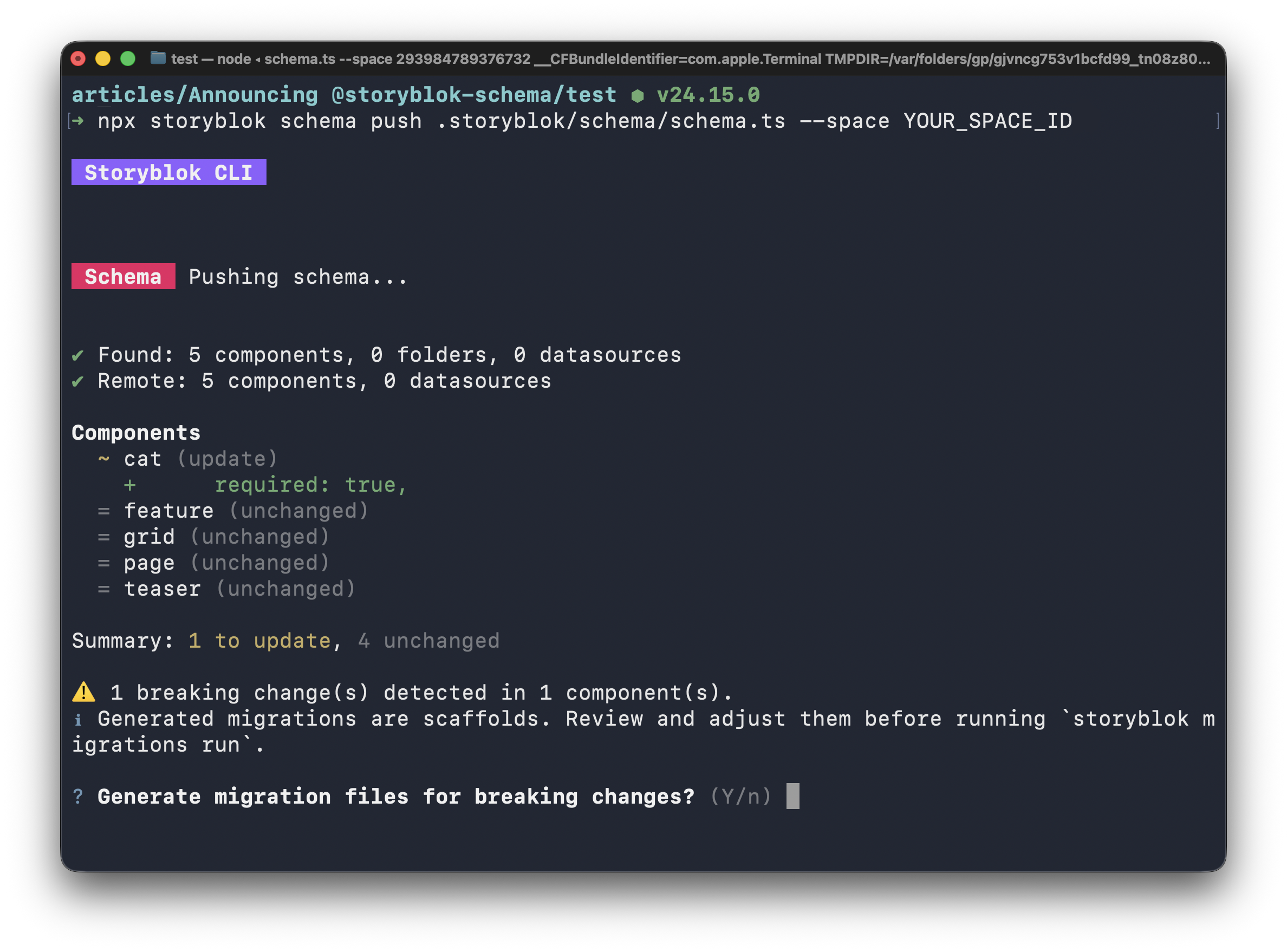
The auto-generated migrations are just scaffolding without any actual migration logic. Once we've filled in the details, we can apply them using the CLI's migrate command.
Modular schema architecture
Schemas are just code and can be treated accordingly. They can be edited by your AI agents, checked into version control, and composed in a modular fashion. Let's say we wanted to not only publish cat content, but also give dogs some love. From a data perspective, cats and dogs have significant overlap; both will need fields for a name and picture.
To adhere to the DRY principle, we can take the field definitions from the cat schema, move them to a new file, and export them as individual variables:
import { defineField } from "@storyblok/schema";

export const animalNameSchema = defineField("name", {
  type: "text",
  required: true,
});

export const animalPictureSchema = defineField("picture", {
  type: "asset",
  required: true,
});
We can now import the two field schemas and reuse them across the cat...
import { defineBlock } from "@storyblok/schema";
import { animalNameSchema, animalPictureSchema } from "../shared/fields.ts";

export const catBlock = defineBlock({
  name: "cat",
  is_root: true,
  is_nestable: true,
  fields: [animalNameSchema, animalPictureSchema],
});
... and dog block schemas:
import { defineBlock, defineField } from "@storyblok/schema";
import { animalNameSchema, animalPictureSchema } from "../shared/fields.ts";

export const dogBlock = defineBlock({
  name: "dog",
  is_root: false,
  is_nestable: true,
  fields: [
    animalNameSchema,
    animalPictureSchema,
    defineField("breed", { type: "text" }),
  ],
});
@storyblok/schema and your frontend code
Schemas are the new single source of truth for both the data in your space and your frontend code. However, since they include type information for every conceivable use case, they need a bit of processing before they are useful for writing frontend components. To extract only the essentials from a schema type, use the utility type BlockContent<typeof blockSchema, Blocks>:
import { type BlockContent } from "@storyblok/schema";
import { type schema } from "./.storyblok/schema/schema.ts";

type Cat = BlockContent<typeof schema.blocks.catBlock>;
// { component: "Cat", name: string, picture: Asset }
// Excludes information about nestability, created_at etc.
The resulting type is ready to use with any frontend tech stack. Here is a basic example with React:
import { type BlockContent } from "@storyblok/schema";
import { type schema } from "./.storyblok/schema/schema.ts";

type CatProps = {
  blok: BlockContent<typeof schema.blocks.catBlock>;
};

export function Cat({ blok }: CatProps) {
  return (
    <figure class="cat">
      <img src={blok.picture.filename} alt={blok.picture.alt ?? ""} />
      <figcaption>{blok.name}</figcaption>
    </figure>
  );
}
@storyblok/schema and the new API clients
Schemas integrate with the recently-stable @storyblok/api-client and @storyblok/management-api-client. These are new, type-safe API clients for talking to Storyblok's Content Delivery and Management APIs. Their methods support a certain degree of type-safety out of the box, but these types are not specific to your project by default:
import { createApiClient } from "@storyblok/api-client";

const client = createApiClient({
  accessToken: "YOUR_ACCESS_TOKEN",
  region: "eu",
});

// data.story.content is an unspecific type that describes no particular component
const { data } = await client.stories.get("home");

// content.component is just a string with no compile-time meaning
if (data?.story.content.component === "cat") {
  // Does NOT type check; TS does not know that "cat" components have a picture
  console.log(data.story.content.picture.filename);
}
The withTypes<Schema>() method, available on both API clients, provides clients with schema-derived type information. As a result, the Content Delivery API client returns correctly typed stories...
import { createApiClient } from "@storyblok/api-client";
import { type Schema } from "./.storyblok/schema/schema.ts";

const client = createApiClient({
  accessToken: "YOUR_ACCESS_TOKEN",
  region: "eu",
}).withTypes<Schema>(); // ← provides the schema type info

// data.story.content is now a discriminated union of the schema's blocks
const { data } = await client.stories.get("home");

// Switching on component names serves as a type guard
if (data?.story.content.component === "cat") {
  // Type checks and is narrowed to the "asset" field type
  console.log(data.story.content.picture.filename);
}
... while the Management API client correctly rejects payloads that are invalid according to the schemas:
import { createManagementApiClient } from "@storyblok/management-api-client";
import { type Schema } from "./.storyblok/schema/schema.ts";

const client = createManagementApiClient({
  personalAccessToken: "YOUR_PERSONAL_ACCESS_TOKEN",
  spaceId: YOUR_SPACE_ID,
  region: "eu",
}).withTypes<Schema>(); // ← provides the schema type info

await client.stories.create({
  body: {
    story: {
      name: "Toby",
      slug: "toby",
      // Type error: property "picture" is missing in "content"
      // the cat schema defines "picture" as mandatory
      content: {
        component: "cat",
        name: "Toby the Ragdoll",
      },
    },
  },
});
This illustrates how @storyblok/schema is more than just another library for managing component types in Storyblok projects. It also forms a new foundation that the rest of the ecosystem can build upon, and will continue to build upon.
Frequently asked questions
What's new compared to previous versions?
While the broad strokes are unchanged compared to the initial pre-release phase, quite a few API changes have been implemented over the past few months. Read the schema reference for a definite guide on the current APIs. Some highlights include:
- The type-safe
defineSchema()function replaces the plain object previously used to bundles blocks, folders, and datasources in a root schema. defineFieldPlugin()bind a custom field_type to any Standard Schema validator. Official field plugins are provided via the@storyblok/schema/field-pluginmodule.validateSchema(schema),validateStory(story, schema), andcreateStoryValidator(rootBlock, schema)are non-throwing runtime validators. WhilevalidateSchema(schema)checks a schema for structural issues,validateStory()verifies that a story's content conforms to the schema.createStoryValidator()wrapsvalidateStory()as a validator for use with other Standard Schema tooling.
If you have more ideas for improvements, file a feature request on GitHub!
What happens when I use schemas and perform component updates in Storyblok's UI?
Two-way sync between schemas and the Storyblok UI is neither supported nor recommended. Both the UI and the schema objects work on the assumption that they define the single source of truth. A schema push after changes in the Storyblok UI will result in an error that can only be rectified by overwriting the previous changes.
Can I disable the UI for updating component types entirely?
You can use the permissions system to stop users from updating content types via the UI.