Building an Agentic Harness for Storyblok on Amazon Bedrock AgentCore

Storyblok is the first headless CMS that works for developers & marketers alike.
Does your agent follow defined rules every time, or only most of the time? Does "never publish a new entry" still hold after a hundred runs?
An agent that only knows its rules as prose follows them most of the time. For a launch page going out to three markets, "most of the time" is a story sitting in the wrong workflow stage with nobody reviewing it.
This article walks through an agent that turns a product-launch brief into a Storyblok landing page, and the harness that makes its rules hold. The examples come from a real project, and the patterns carry over to any content type or workflow.
What the agent does
A marketer hands the agent a product brief, and the agent works through the launch in five steps:
- It maps the brief to the components the
productPagecontent type allows (hero,benefit cards,spec table,gallery,related products). - It writes customer-facing copy in the brand's voice, regardless of the brief's voice.
- It localizes the page into provided locales. (ex: de and ja).
- It writes alt text and SEO metadata in every locale.
- It moves the story into the Reviewing workflow stage, which has no publishing rights, and ends the run.
It never stops to ask a question and never fails for missing content: whatever the brief leaves out becomes a marked placeholder and a comment for the reviewer. The result is a draft that a person checks and publishes from the Visual Editor.
The build uses these products/services:
Product | Role |
|---|---|
Hosts the agent (direct code deployment) and serves the endpoint callers invoke | |
The harness SDK: the agent loop, tools, interventions, and plugins the harness is built from | |
The model | |
Exposes the Storyblok MCP server to the agent as tools, behind IAM auth | |
Allows an explicit list of Storyblok operations on the Gateway and denies everything else | |
Stores the Storyblok personal access token (PAT) as a credential provider the Gateway attaches to requests | |
Hosts the Agent Skills, so an instruction change is an upload instead of a redeploy | |
Every read and write against the space, except the two below | |
AI branding and AI translation, which the MCP server doesn't expose |
How the products work together:
Every call to the target Storyblok space ,whether it goes through the MCP or the MAPI, goes through the Gateway, and Cedar authorizes each one so the runtime holds no Storyblok credential:
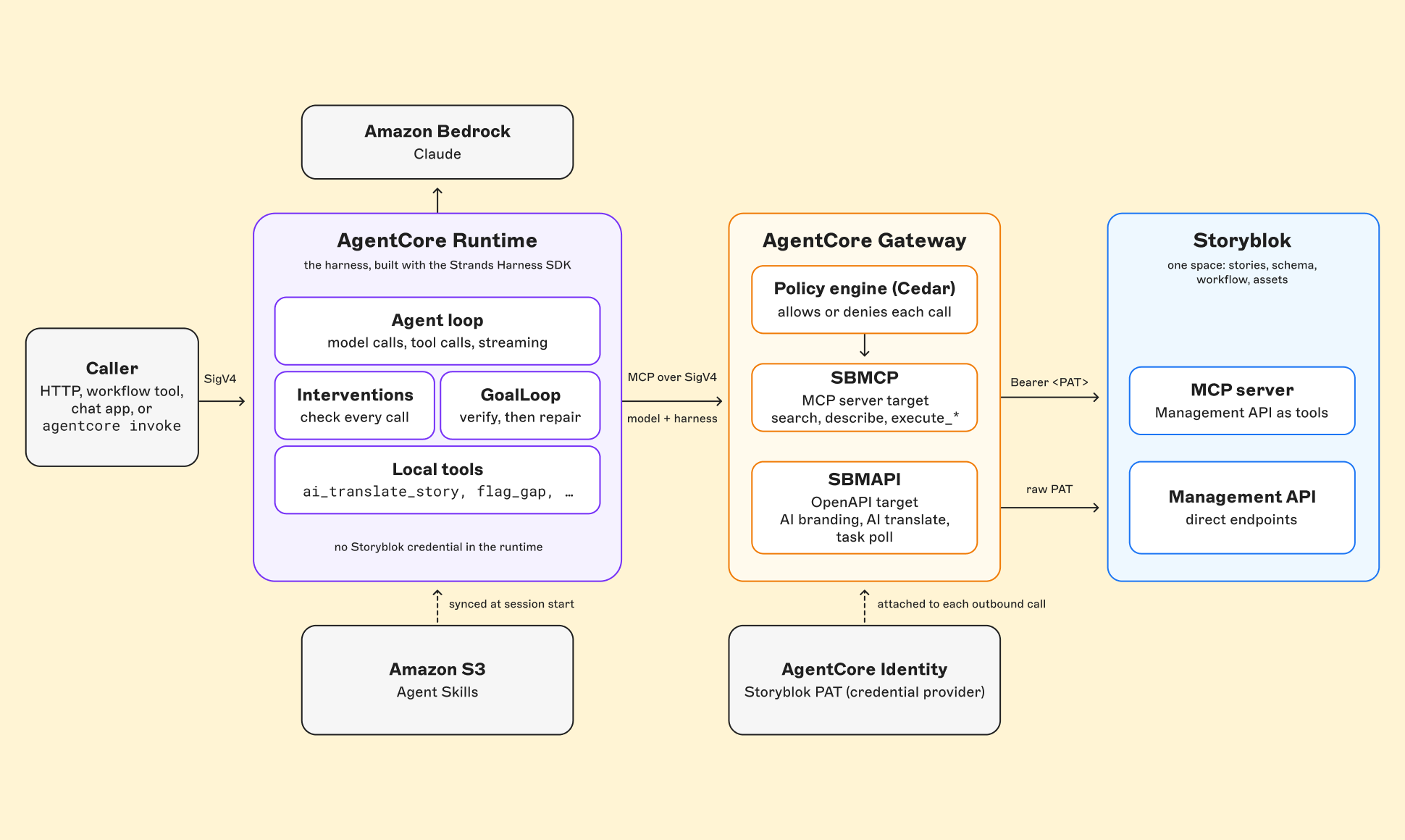
Skills live in S3 because instructions change more often than code: the runtime syncs the bucket at session start and keys its cache on the bucket listing, so editing a SKILL.md changes the listing and the next session picks up the new version with no redeploy, so an edited SKILL.md takes effect on the next session with no redeploy.
One Gateway to rule them all
The PAT lives in AgentCore Identity, as an API-key credential provider (<your-credential-name>). Both the SBMCP target and SBMAPI target reference it, and the Gateway attaches it to each outbound request.
SBMCP is an MCP server target pointing at Storyblok's MCP server. The agent gets its tools as SBMCP___search, SBMCP___describe, SBMCP___execute_readonly, and SBMCP___execute_mutating, and the Gateway sends Authorization: Bearer <PAT>.
To learn more on how the Storyblok MCP works, read Using the Storyblok MCP Server: A Practical Guide.
SBMAPI is an OpenAPI target for the Management API calls the MCP server doesn't expose. A small OpenAPI spec kept in the repo defines three operations:
getAiBrandingRules:GET /spaces/{space_id}/ai_branding_rulesaiTranslateStory:PUT /spaces/{space_id}/stories/{story_id}/ai_translate, with a body of lang, overwrite, and codegetBackgroundTask:GET /spaces/{space_id}/background_tasks/{task_id}to poll the progress of translating a story
While developing, it was observed that the Gateway turns each operation into a tool (SBMAPI___<operationId>) and flattens path parameters and the JSON body into top-level arguments (space_id, story_id, lang), which matters for policy.
This project creates both targets with the AWS CLI, separately from the CDK stack that deploys the runtime and Gateway, and keeps the spec and request files in version control:
aws bedrock-agentcore-control create-gateway-target --cli-input-json
file://create-target.json{
"gatewayIdentifier": "<your-gateway-id>",
"name": "SBMAPI",
"targetConfiguration": {
"mcp": { "openApiSchema": { "inlinePayload": "<the OpenAPI spec as a JSON string>" } }
},
"credentialProviderConfigurations": [
{
"credentialProviderType": "API_KEY",
"credentialProvider": {
"apiKeyCredentialProvider": {
"providerArn": "<your-credential-provider-arn>",
"credentialParameterName": "Authorization",
"credentialPrefix": " ",
"credentialLocation": "HEADER"
}
}
}
]
}Spec changes are push with the AWS CLI command update-gateway-target.
The Management API wants the raw token in the Authorization header. The Gateway requires a non-empty credentialPrefix, so the prefix is a single space: leading whitespace in a header value is optional, so the server reads the raw token.
The guardrails the agent works within
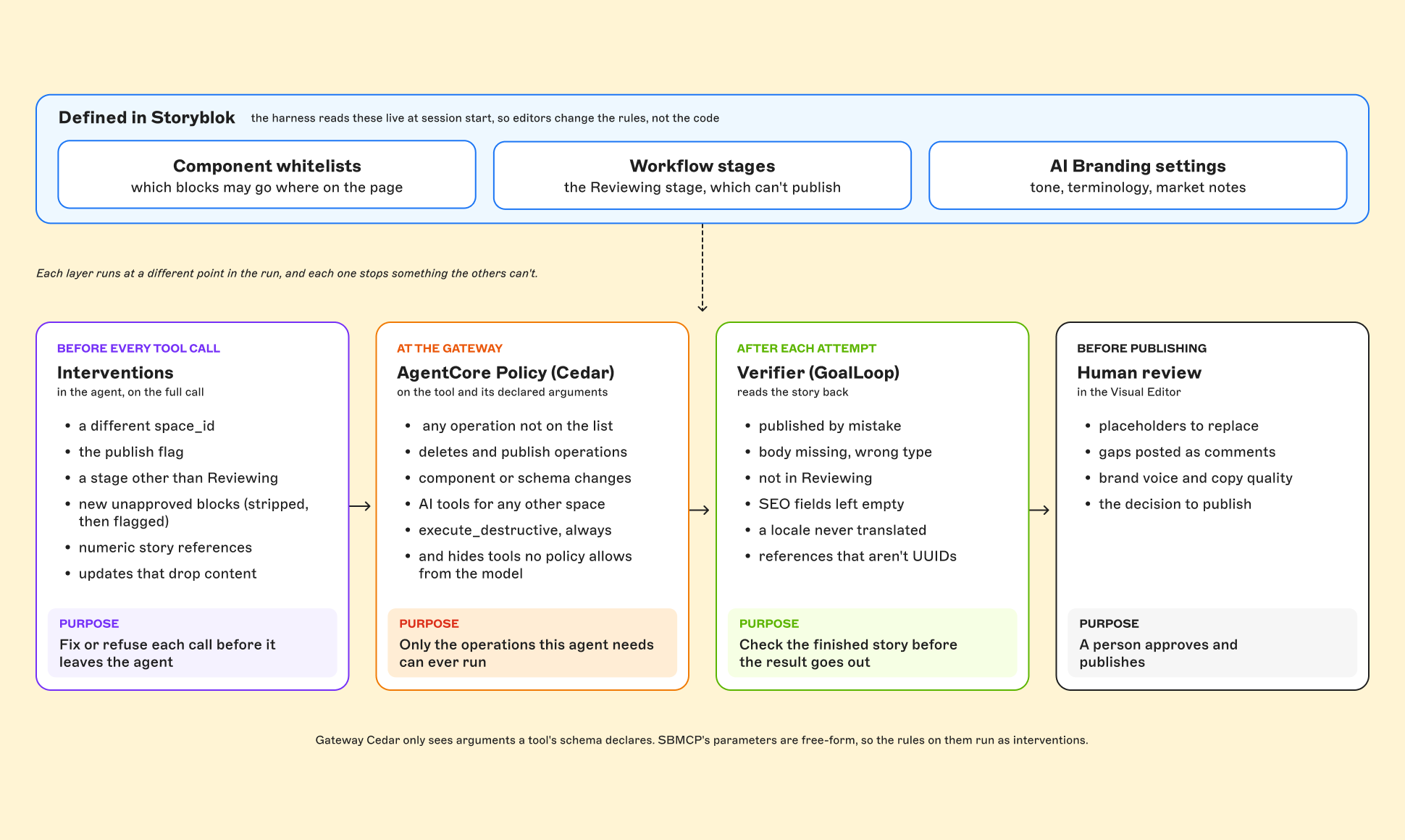
The space's settings and the policy on the Gateway are guardrails that sit outside the harness code. There are four layers that enforce them at different points in a run, each stopping something the others can't:
Guardrails in Storyblok
The component allowlist. The productPage body field has managed access to nestable blocks, limiting the accepted components to: hero, cards, specTable, gallery, relatedProducts, and a few more. Nested block fields carry their own (a hero's button field only accepts a button block). The harness reads these lists live and hands the to the model with the instruction to use no other component and no other field name.
The workflow. The agent has no way to publish, and every story it touches ends in the Reviewing stage. This space also has a stage called "Ready to Publish" which allows publishing. So the harness resolves the stage by exact name and rejects any candidate that can publish:
function resolveReviewStage(stages: WorkflowStage[]) {
  const named = stages.find((stage) => stage.name === REVIEW_STAGE_NAME);
  if (named && !isPublishingStage(named)) return { reviewStage: named };
  // ... otherwise fall back to the closest non-publishing stage, with a warning
}
AI Branding settings. The space's AI Branding settings describe the brand: tone, writing style, formatting, terminology to always use, commonly use, avoid, and never use, and market-specific notes (drop American colloquialisms for the German and Japanese markets). The harness fetches them fresh every session, with no cached fallback (as rebranding can happen at anytime). If the fetch fails, the agent writes neutral, factual copy and flags that it needs a voice pass.
Guardrails in AgentCore Policy
The policy engine on the Gateway decides which tool calls reach Storyblok at all. It has four policies:
- Discovery is unconditional.
SBMCP___searchandSBMCP___describeare read-only tools, so they're always allowed. - Execution is an allowlist.
SBMCP___execute_readonlyandSBMCP___execute_mutatingare allowed only for 13 named operations: eight reads (stories, assets, asset folders, components, workflow stages, and the space itself) and five writes (createStory,updateStory,updateAsset,createWorkflowStageChange, andcreateDiscussionForStory). Only the operations needed to create the launch page are allowed. - Destructive calls are forbidden outright.
SBMCP___execute_destructivehas a forbid policy as a backstop, so it stays denied even if a futurepermitis written too broadly. - The AI tools are scoped to one space.
allowStoryblokAiToolspermits the three SBMAPI tools only whenspace_idis this deployment's space.
Everything else is denied by default: deleting stories or assets, every publish operation, and any change to components or the schema.
The SBMCP allowlist keys on operation, the top-level argument every execute_* call carries:
permit (
    principal,
    action in [
        AgentCore::Action::"SBMCP___execute_readonly",
        AgentCore::Action::"SBMCP___execute_mutating"
    ],
    resource == AgentCore::Gateway::"<your-gateway-arn>"
)
when {
    [
        "getStoryById",
        "listStories",
        // ...
        "createStory",
        "updateStory",
        "createWorkflowStageChange",
        "createDiscussionForStory"
    ].contains(context.input.operation)
};
Because SBMAPI's arguments are top-level, Cedar can read them:
permit (
    principal,
    action in [
        AgentCore::Action::"SBMAPI___getAiBrandingRules",
        AgentCore::Action::"SBMAPI___aiTranslateStory",
        AgentCore::Action::"SBMAPI___getBackgroundTask"
    ],
    resource == AgentCore::Gateway::"<your-gateway-arn>"
)
when {
    context.input has space_id &&
    context.input.space_id == <your-space-id>
};
This is a permit with a condition rather than a forbid. If the condition doesn't hold, or can't be evaluated, no policy applies and the call is denied. Tested against the live Gateway, the policy allows the right space and denies a wrong space, a string-typed space_id, and a missing space_id. SBMCP is different. Its tools nest everything under parameters, and Cedar doesn't see nested parameters, only top-level arguments like operation. So on SBMCP, Cedar decides which operations run, and the space ID, the publish flag, and the review stage are enforced by the harness's hooks.
The harness
The Strands docs define an agent harness as "the software around a model that turns it into an agent", and the Strands Harness SDK is for building one: the loop plus tools, plugins, hooks, interventions, sessions, and memory. This project composes its harness from those building blocks and adds the Storyblok-specific pieces on top:
Agentruns the loop.tool()defines the local tools.McpClientwith toolFilters brings in the Gateway's tools, withSBMAPIhidden.InterventionHandleris the guard on every tool call.GoalLoopruns verify and repair.AgentSkillsloads the skills.
An agent like this has a long list of hard rules: never publish, always end in Reviewing, send the full content on every update, use story UUIDs in reference fields, write SEO in every locale, and confirm every write landed. Written into a skill as prose, each one holds only as long as the model remembers it. So the harness follows one principle: if a rule can be checked in code, check it in code.
agentcore invoke
Here's everything that happens on a single run:
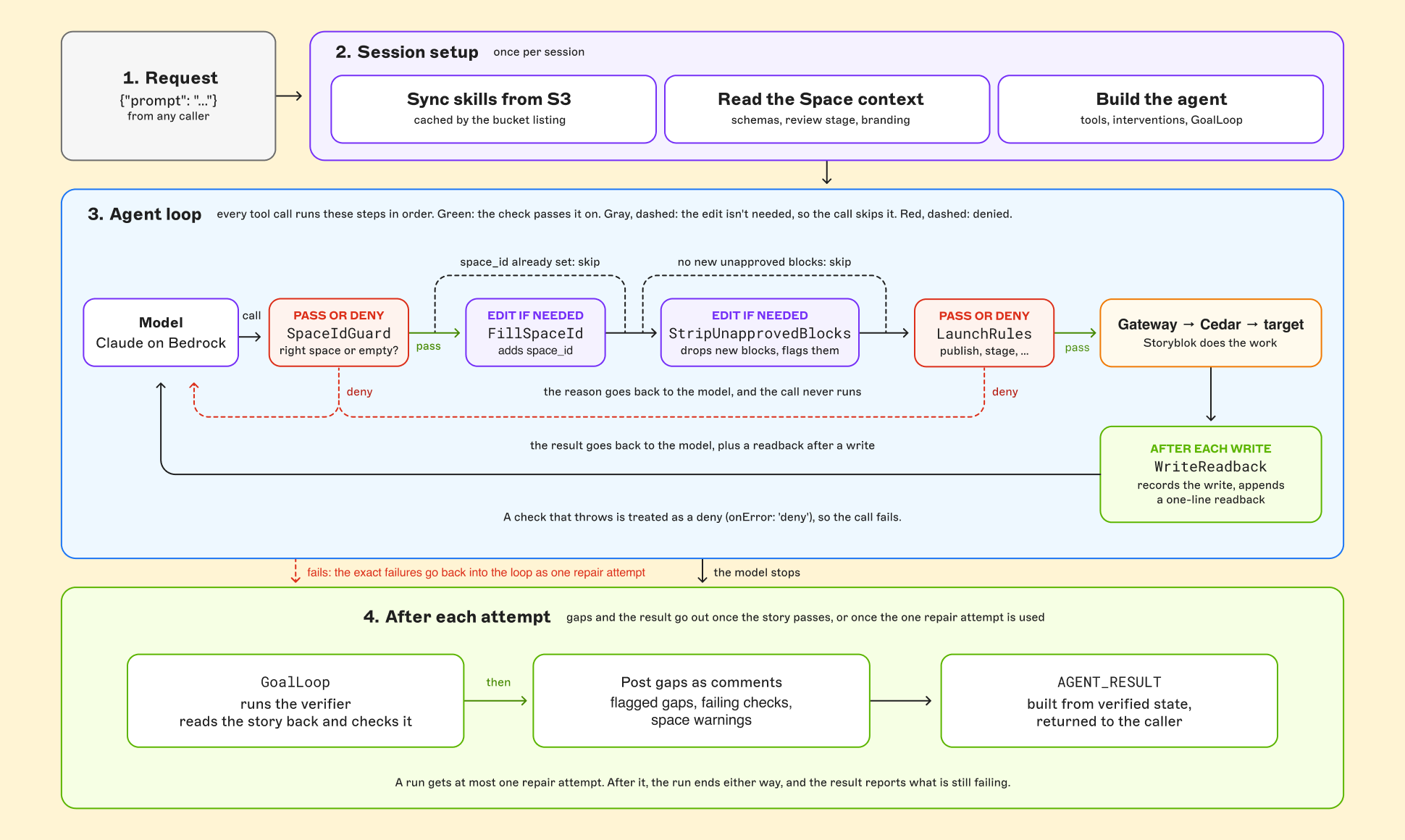
- The request arrives as
{"prompt": "…"}atmain.ts, the runtime entrypoint, which streams the model's turns back to the caller and writes the final result. - Session setup runs once per session:
skills.tssyncs the skills bucket from S3.space-context.tsreads the space: component schemas, workflow stages, folders, and languages throughSBMCP, and AI Branding throughSBMAPI. It picks the review stage and renders everything into the Space context, a section of the system prompt the harness generates. The guards and the verifier check writes against this same data.- The agent is built with its tools (
ai_translate_story,flag_gap,read_skill_resource, and the Gateway'sSBMCPtools), its intervention pipeline, and two plugins:AgentSkillsand aGoalLoopthat runs the verifier.
- The agent loop runs, and every tool call passes through the intervention pipeline, in order:
SpaceIdGuarddenies any call that names a differentspace_id.FillSpaceIdaddsspace_idwhen the model leaves it out.StripUnapprovedBlocksremoves blocks the allowlist doesn't allow and flags each one.LaunchRulesdenies rawSBMAPIcalls, the publish flag, direct comment posting, any stage but review, the wrong content type on create, non-UUID references, and updates that would drop content.- The call goes Gateway → Cedar → target, then
WriteReadbackrecords the write in the run tracker (the run's record of what actually happened, taken from tool results rather than the model's summary), reports stripped blocks, and appends a one-line readback. - The content checks live in
story-checks.ts, shared with the verifier so both judge a story by the same rules.
- After each attempt:
GoalLooprunsverifier.ts, which reads the story back and checks it. If something fails, the model gets one repair attempt with the exact failures.story-comments.tsposts every gap as a discussion on the story: the ones the model recorded withflag_gap, any check still failing, and any space warnings.main.tsbuildsAGENT_RESULTfrom the run tracker and the verifier, and returns it to the caller.
Calling the Gateway from code
The connection in gateway.ts is signed with the runtime's IAM role and exposes two helpers: callGateway wraps SBMCP's {operation, parameters} shape, and callTool calls a flat-argument tool like SBMAPI's by name:
// Read a story through SBMCP's execute_readonly tool.
const { story } = await callGateway({
  tool: 'SBMCP___execute_readonly',
  operation: 'getStoryById',
  parameters: { id: storyId },
  retry: true,
});

// Fetch AI Branding through SBMAPI; space_id is a top-level argument Cedar checks.
const branding = await callTool('SBMAPI___getAiBrandingRules', { space_id: spaceId }, { retry: true });
Cedar authorizes these calls like any other. Reads retry once on a dropped connection. Writes never retry, because a write that failed in transit may still have landed.
Local tools
Three tools run in the harness itself, all defined with Strands' tool():
ai_translate_storywrapsSBMAPI. It callsSBMAPI___aiTranslateStory, pollsSBMAPI___getBackgroundTask, and counts the__i18n__<lang>fields on the story, read throughSBMCP. It queues jobs per story, since two jobs on one story race and one locale ends up empty. The Gateway reports a finished, deleted task as a generic tool error, so an error means "re-read the story", and the tool gives up only after three errors in a row with no new fields. Then the translated content is added via callingupdateStoryflag_gaprecords a gap for the reviewerread_skill_resourceopens a skill's reference files.
The raw SBMAPI tools are hidden from the model with the Strands MCP client's toolFilters.rejected option, which drops tools whose names match a pattern, and the LaunchRules hook blocks them as a backstop. The model always translates through the wrapper and its queue.
Check every write, before and after
The guards are Strands intervention handlers, classes that extend InterventionHandler, registered with new Agent({ interventions: [...] }). Handlers run in order on each tool call, and each returns one action: a transform edits the call for the handlers after it, and a deny cancels the call, skips the rest, and shows the model the reason. One action per handler is why the launch rules are an ordered pipeline rather than one class. Here's FillSpaceId :
class FillSpaceId extends InterventionHandler {
  readonly name = 'storyblok-fill-space-id';
  override readonly onError: OnError = 'deny'; // a check that throws blocks the call

  override beforeToolCall(event: BeforeToolCallEvent) {
    const call = storyblokCall(event); // the SBMCP execute_* call's parameters, or null
    if (!call || call.params.space_id !== undefined) return proceed();
    const input = event.toolUse.input as Params;
    return transform(() => {
      input.parameters = { ...call.params, space_id: this.ctx.spaceId };
    });
  }
}
Write the cancel message for the model. A blocked call that says what to change gets fixed on the next turn. A bare "denied" gets retried as-is, or worked around.
These are the checks Cedar can't make, because they depend on parameters or on the story's current state:
- Space ID (
SpaceIdGuard): the PAT behind the Gateway can reach other spaces, and Cedar can't checkspace_id, so this hook is what confines the agent to one space. It scans every tool call's input for aspace_idthat isn't the configured one and blocks it. If the configured space can't be read, it blocks every space-scoped call. - Publish flag: Cedar denies publish operations, but
publish: trueon an allowedupdateStoryis another route. The hook blocks the flag in any form (true,1,"1"). - Review stage only:
createWorkflowStageChangemust target the review stage resolved at session start. - UUIDs in reference fields: the hook walks the content tree and rejects any value in a story-reference field that isn't a UUID. The live schema decides which fields are references. A numeric story ID looks populated in the API response and renders nothing on the frontend.
- No destructive updates:
updateStoryreplacesstory.contentin full, so sending{"component": "productPage"}wipes the page's body. Before every update, the hook reads the current story and blocks the call if it would change the component, shrink body, or drop a field that had a value.
After every successful create, update, or stage change, WriteReadback, an after-call handler, reads the story back and appends one line to the tool result: block count, stage, published flag, SEO status per locale, and reference shapes. A 200 doesn’t necessarily mean success: the MCP server reports API failures as a successful tool result carrying "success": false, so the readback reports what Storyblok actually stored.
Verify the story
Strands' GoalLoop plugin with a programmatic validator is used to verify and repair. The critical checks are that the story is unpublished, the body is present, the content type is right, and the story sits in the review stage. The rest cover references, SEO in each translated locale, and translated fields per locale. On failure, the validator returns feedback, and GoalLoop sends it back into the same agent loop as a user message:
new GoalLoop({
  goal: async () => {
    if (tracker.storyId === null) return true; // nothing was built, so nothing to verify
    const verification = await verifyStory(tracker.storyId, ctx, tracker); // read back and run every check
    if (failures(verification).length === 0) return true;
    return { passed: false, feedback: repairPrompt(verification) }; // the exact failures, as the next message
  },
  maxAttempts: 2, // the first attempt plus one repair
  resumePromptTemplate: (feedback) => feedback ?? 'Re-check the story and fix anything left.',
});
resumePromptTemplate passes the repair prompt through as-is. A run still failing after one targeted repair needs a human. The run ends with an AGENT_RESULT line: a single JSON line carrying the status, story URL, and locale results. The harness builds it from what the verifier found, so the caller reads a checked result rather than the model's account of it. The model contributes only a one-sentence NOTES: line.
Identify gaps for the reviewer
If the agent spots any gaps: no spec values in the brief, a related product that doesn't exist yet, a locale that isn't enabled, the model records each one with a flag_gap tool, optionally pinned to a block's _uid and field, and nothing is posted during the run.
After verification, the harness posts every recorded gap as a discussion on the story (createDiscussionForStory), plus any failing check and session warning. Posting at the end keeps resolved gaps from becoming stale comments, and LaunchRules blocks the model from posting discussions itself, so each gap gets posted once. Storyblok requires a block_uid on every discussion, so a story-level gap, or one naming a block that doesn't exist on the story, attaches to the story's root block (content._uid), with the block and field it was about kept in the message.
Trim the skill to judgment
The main skill covers only what code can't do: reading the brief, matching it to components by purpose, shaping each field type (richtext, assets, tables, references, localized values), building the page when content is missing, and writing in the brand's voice. The rules belong to the harness. The skill opens by telling the model what the harness owns, so a blocked call reads as feedback instead of a failure.
Why the harness is built this way
Each piece moves a responsibility from the model's memory to something that runs every time. An intervention runs on turn 40 the same as turn one. The Space context stands in for the discovery calls the model would otherwise make (a schema per component, the stages, the folders), whose results would stay in context all run. A one-line readback replaces pulling the full story back after every write. The verifier catches what interventions can't: calls that never happened, like an SEO field never written. And the caller gets the checked status, not the model's account of it.
“Always succeed, never fail”
The agent never fails for missing content, and it never asks for input. Anything that names a product counts as a brief, however thin, and the agent builds the page from what's there.
Missing content becomes a clearly marked placeholder, not an empty field:
- Text, richtext, and SEO fields get
[Placeholder: <what's needed and where it comes from>], in every locale for SEO. - Assets get a real stand-in asset from the space, so the field renders.
- Tables get one row of placeholder cells.
- Story references, numbers, dates, and options stay empty. There's no safe placeholder for a UUID, a price, or a launch date.
Every placeholder gets its own flag_gap, pinned to its block and field, so the reviewer finds each one as a comment in the Visual Editor.
The agent also never asks the caller a question or waits for an answer: whatever triggered the run might never read anything but the final result. A question in the output is a gap that wasn't flagged. Only input that names no product at all, like a greeting, creates nothing.
Placeholders and the verifier work together: the verifier checks shape (SEO set, locales present, body intact), so a thin brief still passes, and the comments make sure a human replaces every placeholder before publishing.
Designed for human review
Every run ends the same way, on purpose: an unpublished story in Reviewing, a comment wherever something needs a decision, and a status for the caller. The agent assembles, localizes, and writes metadata. A person verifies, resolves the comments, and publishes from the Visual Editor.
The guardrails exist to make that handoff trustworthy. Cedar denies publish operations, LaunchRules blocks the publish flag, the stage is pinned to Reviewing, and the verifier fails any run that ends outside review. Nothing goes live without a reviewer.
Adapting this to your own schema
Most of this harness is generic. What changes is the handful of facts it enforces. Seven changes point it at your own space:
- Content type: set the content type the harness builds (
productPagehere). The Space context walks its block allowlists, so the component map follows your schema. - Review stage: set your review stage's exact name and remove Publish and schedule permissions. The harness still rejects it if it can publish.
- Reference fields: nothing to configure. Any field whose schema type is option or options with
source: "internal_stories"(Storyblok's story-reference fields) gets the UUID check. - SEO fields: the harness reads them from the content type's SEO tab, or falls back to fields named like
meta_*andog_*. - Cedar allowlist: list exactly the operations your agent needs, and add new ones only when you mean to.
- Missing APIs: if your MCP server lacks an API you need, publish it as an OpenAPI target whose tools take top-level arguments, so Cedar can check them.
- Your own invariants: write each hard rule as a hook check that returns a clear reason to cancel, and add the matching check to the verifier.
The pattern carries over, and the Storyblok-specific parts are the facts: updateStory replaces content in full, reference fields take UUIDs, localized values sit in __i18n__ fields, and publishing is a workflow decision.
Wrap up
A reliable agent needs more than good instructions. By enforcing rules in code and verifying what Storyblok actually stores, this harness turns product briefs into localized landing pages without handing over publishing control. The agent handles the assembly; people make the final decisions. Start with the rules your workflow can’t afford to break, and build those into your harness, not just your prompt.
If you want to learn more about the MCP, check out the Storyblok MCP server documentation.