Find Everything Everywhere all at once with the CLI's new find Command

Storyblok is the first headless CMS that works for developers & marketers alike.
The new find command is now available in the latest version of the Storyblok CLI. Using find, you can search a Storyblok Space using a variety of queries and filters. The command writes JSONL results to stdout, ready to be piped into other CLI tools. While this feature is only a single command performing the in principle straightforward task of searching, find does punch above its weight. A multitude of options allow you to scope, filter, and optimize the search operation, while the output can be handed off to other tools and systems, making it exceedingly powerful.
This tutorial explores the most important aspects of the new find command, some of its possible applications, and dives into a few optimization techniques. Refer to the documentation for a full list of all available flags and features, and keep reading to learn how the new command works and what you can do to get the most out of it.
In a nutshell
The find command finds stories and folders in a Storyblok Space and writes the resulting JSON objects to stdout as one line per story (known as JSONL). The following searches the Space with ID 23421337 for any content related to cats:
storyblok stories find "cats" --space 23421337Assuming you are authenticated via storyblok login and have access to the Space in question, the above command will search the entire Space for any mention of cats. If it manages to locate some cat content, the result is a plain table of results:
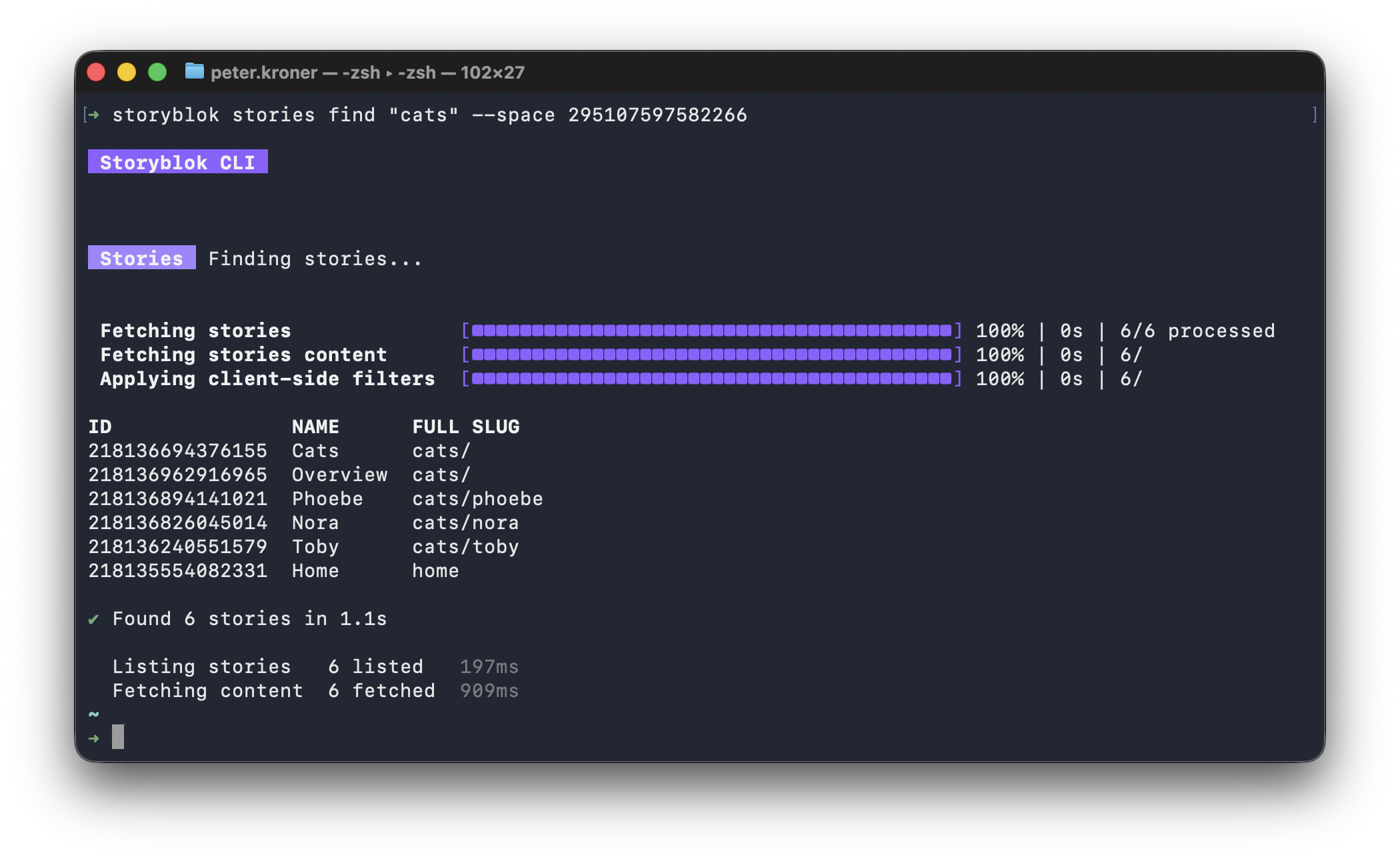 While such a table can have some uses, the
 find command really shines when you use pipes to send the output into files or other CLI commands:
storyblok stories find "cats" --space 23421337 > results.txtWhen piped into something else, find no longer prints a human-readable table. Instead, it outputs whole JSON-encoded Story objects. The addition of > results.txt in the above command switches find from table mode to JSON mode and writes the output from find into results.txt, ready to be processed further. This illustrates the general workflow of using the new command: you formulate a search query and process the results by piping them to other tools or files.
A series of pipes
Unix pipes are a mechanism for inter-process communication in Unix-like operating systems such as macOS, Linux, and WSL on Windows. Pipes connect a set of processes into a pipeline, in which the output text of each process (stdout) gets passed as input (stdin) to the next process. Since Unix-like systems treat everything as a file, there is no distinction between piping output to another process or writing it to a file.
To illustrate this principle, we can employ the ubiquitous wc utility to count the number of results delivered by the find command:
storyblok stories find "cats" --space 23421337 | wc -l
6
The -l flag invokes wc in line-counting mode, and since find yields results one line per Story, the 6 indicates that there are 6 pieces of cat content in our space. If we feel compelled to make our pipe even longer, we can augment the command to write the number to a file:
storyblok stories find "cats" --space 23421337 | wc -l > count.txtHere, find pipes into wc, which redirects into count.txt, creating or overwriting the latter's contents due to the use of > over |. This is a basic example on its face, but illustrates how find can be combined with every CLI utility on the planet, increasing its usefulness while keeping the command itself straightforward. There is, for example, no built-in way to have the find command output a well-formed JSON array, but a pipe to jq is all we need to get there:
storyblok stories find "cats" --space 23421337 | jq -s "." > results.jsonjq -s takes lines of JSON and wraps them in an array, which is then directed into results.json - a valid, pretty-printed JSON document. While at it, we can apply jq's functionality to extract specific data from the results:
storyblok stories find "cats" --space 23421337 | jq -s 'map(.name)'
["Cats", "Overview", "Phoebe", "Nora", "Toby", "Home"]
As long as it supports stdin and stdout, any CLI tool can be plugged into a pipeline that uses find - from third-party utilities to your custom scripts. But before you resort to beating every problem into submission with pipes, it's worth understanding how find actually works.
Anatomy of the find command
The find command takes options and an optional text argument:
storyblok stories find [text] [options]When text is set, find performs a case-insensitive full-text search for text over Story name, slug, and content. The other options combine with text and with each user using AND.
The command with all its flags and features presents a unified user experience, but its operation includes a whole pipeline with distinct steps. Understanding this pipeline enables you to fine-tune your queries for sometimes significant performance improvements.
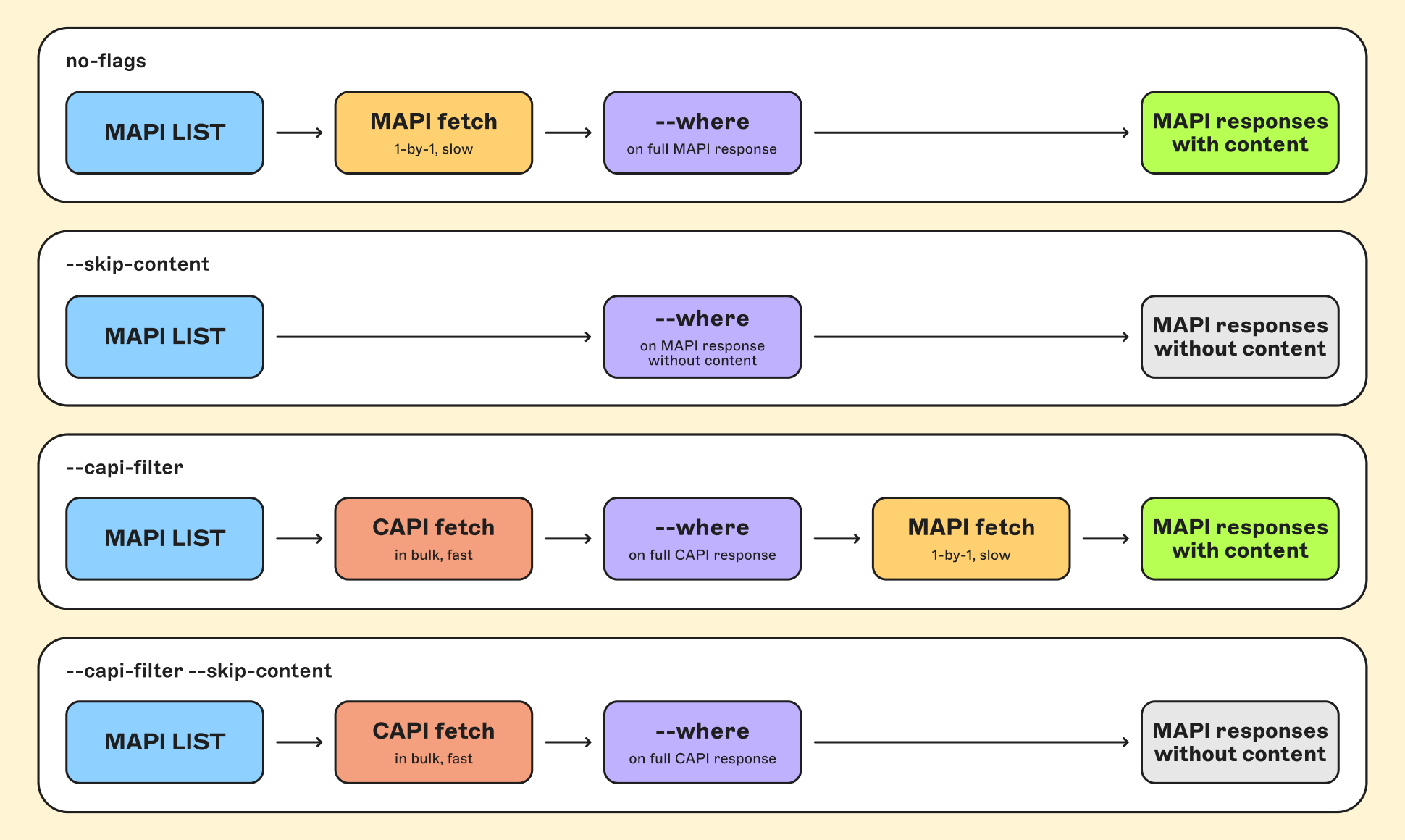
When you run a find command, usually three things happen in sequence:
- The CLI invokes the Management API (MAPI) to load a list of Story objects
- Since listing Stories via the MAPI does not return the Story's contents, the second step consists of loading the content for every story one by one
- Once the content has arrived, content-dependent filters such as
--whereare applied client-side, and the final results are written to stdout
This sequence is what makes the advanced filtering features of find work. The powerful --where option selects results based on a JSONPath expression and can, for example, locate stories containing assets with missing alt text:
storyblok stories find --where "$..[?(@.fieldtype == 'asset' && @.alt == '')]" --space 23421337Running arbitrary JSONPath queries against sets of Storyblok Story objects is specifically a feature of the find command and not part of either Content Delivery API (CAPI) or MAPI. But to run such queries requires whole stories to be loaded first, which can be a significant bottleneck. Listing stories in the MAPI returns a generous 100 paginated results per request, and filtering results client-side (even multiple, complicated --where queries) is an essentially instant operation. Loading full stories instead requires one whole rate-limited request per story. This presents several opportunities for optimization:
--skip-contentdoes not fetch story content at all, making the entire operation work only on metadata. This eliminates an entire step from the pipeline.- By deliberately narrowing the scope of the initial MAPI request, the total number of stories to be processed in subsequent stages can be reduced significantly.
--capi-filteropts into reading bulk content from the faster Content Delivery API, rather than one story at a time through the Management API
If you're working with a very large Storyblok space, optimizations matter. Scoping the initial listing and deciding whether and how to load content allows otherwise minutes-long operations to finish in seconds.
Applying optimizations
Let's take the previously shown command for locating missing alt text as a baseline. In its original state, it is completely unconstrained, with --where being the only filter. Since this filter has to be applied client-side, all content in the Space needs to be downloaded first. Depending on the space, this may take quite some time, as the find command makes transparent when it finishes:
storyblok stories find --where "$..[?(@.fieldtype == 'asset' && @.alt == '')]" --space 88751 > /dev/null

✔ Found 1661 stories in 603.1s

  Listing stories   3555 listed                        11.1s
  Fetching content  3555 fetched                      601.0s
  Filtering         1661 matched · 1894 filtered out    4.0s
When a single command takes over ten minutes to fetch thousands of stories one-by-one before applying the only available filter, it's high time to optimize.
Shorten the pipeline with --skip-content
The first optimization consideration is whether content is even required for our find operation. In cases where only metadata (such as slugs and IDs) is relevant, --skip-content serves as an instant ticket to a significant speedup. This is unfortunately not the case in our quest for missing alt text, but --skip-content will still turn out to be a valuable tool for us.
Re-scope the initial list query
The next optimization technique is to constrain the scope for the find command. In the absence of filters besides --where, the entire Space's content gets downloaded and filtered, which is rarely appropriate. Most other filter features apply to the initial list operation, which can reduce the workload for all downstream operations. Some examples:
--starts-withfilters based on Story's slugs--includes-blockselects only Stories including certain blocks--scheduled includesonly Stories with a given pending publish date
If we assume that our task around missing alt text only extends to the blog section of our space, we can use --starts-with to filter the initial list by slug:
storyblok stories find --where "$..[?(@.fieldtype == 'asset' && @.alt == '')]" --starts-with "blog" --space 23421337 > /dev/null

✔ Found 190 stories in 68.3s

  Listing stories   397 listed                       2.1s
  Fetching content  397 fetched                     66.1s
  Filtering         190 matched · 207 filtered out  767ms
When adding --starts-with "blog" saves 10 whole minutes, it becomes obvious that scoping the initial MAPI request is an important optimization for all operations involving content. But how can we find out how to re-scope the initial MAPI listing?
The answer is actually --skip-content. Since this option eliminates the most expensive step from the find pipeline, iterating on filters not dependent on content and comparing the results is a fast and easy way to figure out the correct scope for a search query. If the table returned by find does not help while iterating, pipe the results to wc -l if you want to compare the number of results received, or to /dev/null if you are primarily interested in the timings measured by find itself.
Faster fetching with --capi-filter
The --capi-filter flag opts into fetching content in bulk via the Content Delivery API. --where expressions get evaluated against this content, and any remaining Stories are then fetched one-by-one via the MAPI like before. This step therefore ends up making the find pipeline longer than it would otherwise be:
Without | With | |
|---|---|---|
1. | MAPI list | MAPI list |
2. | Fetch content via MAPI | Fetch content via CAPI |
3. | Apply client-side filters | Apply client-side filters |
4. | Re-fetch remaining content via MAPI |
This pays off when loading and pre-filtering the CAPI content reduces the result set such that reloading the content via MAPI (which is the real bottleneck) is significantly sped up. Assuming we are still hunting assets without alt text in the blog:
storyblok stories find --where "$..[?(@.fieldtype == 'asset' && @.alt == '')]" --capi-filter --starts-with blog --space 23421337 > /dev/null

✔ Found 190 stories in 33.3s

  Listing stories   397 listed                     1.4s
  CAPI filter       191 passed · 206 pruned       752ms
  Fetching content  191 fetched                   31.3s
  Filtering         190 matched · 1 filtered out   56ms
The content delivered by the CAPI differs from the content delivered by the MAPI in several ways. Most significantly for the find command, field-level translations are missing from CAPI output. The differences between CAPI and MAPI results have two implications:
- Content that is not pruned by
--wheregets re-fetched via the MAPI. This ensures thatfindalways returns full MAPI payloads, even with-capi-filterset. - As a consequence, what's actually returned from
findis not guaranteed to be precisely the content that--wherefiltered for.
Whether this is an acceptable combination of traits depends on the use case. If the --where expressions target untranslated fields, the difference between CAPI and MAPI payloads is immaterial.
Why not both? Combining --skip-content and --capi-filter
In cases where you don't need content in your find results and don't mind running --where expressions against CAPI results, you can combine --skip-content and --capi-filter to reduce the MAPI's role to providing the initial list:
storyblok stories find --where "$..[?(@.fieldtype == 'asset' && @.alt == '')]" --capi-filter --skip-content --starts-with blog --space 23421337 > /dev/null

✔ Found 190 stories in 1.8s

  Listing stories  397 listed                    935ms
  CAPI filter      191 passed · 206 pruned       814ms
  Filtering        190 matched · 1 filtered out    1ms
Thanks to --capi-filter, the pipeline now applies --where to CAPI content received. Since --skip-content is also set, the command skips fetching content from the MAPI, returning pure metadata instead and making this by far the fastest way to run find. For use cases where you want to collect metadata and don't mind the tradeoff inherent to --capi-filter, this is an entirely appropriate approach towards find.
Optimization overview
As we have seen, the performance difference between optimized and unoptimized find invocations can be stark:
Flags | Time | Notes |
|---|---|---|
None | 603.1s | |
| 68.3 | Constrains initial listing |
| 33.3s | |
| 1.8s | Repsonse without content |
Server-side filters like --includes-block and --starts-with reduce the workload of downstream steps without changing the find pipeline itself. Using --skip-content and --capi-filter can lead to huge performance improvements, but it is important to remember how they change the command's pipeline and result payload:
 If your Storyblok space only contains a few hundred Stories, optimizing
 find may not matter much. For larger projects and for frequent tasks, understanding and shaping the operations behind the curtain is imperative and can save tens of minutes per invocation.
Conclusion
The CLI's new find command searches a Storyblok Space and returns JSONL results to stdout. Its basic functionality is straightforward, but understanding its internals is vital for optimization. There are many more filters and options, all of which you can read up on in the documentation, but there are two main takeaways from this tutorial:
- It's pipes all the way down: combine
findwith other tools, from built-in Unix standards to your own custom scripts. - Optimize, and optimize early:
findcan be blazing fast if you understand the pipeline and apply the right optimizations. Iterate with-skip-contentto scope your request and opt into using the CAPI instead of the MAPI when appropriate.
The find command is brand-new, so remember to let us know if something breaks or if you have ideas for improvement. Head to the discord if you get stuck in any way or just want to hang out with the Storyblok community.